

 HyperFrames
LaunchMotion · ワンキー回答v1.0.1
この Skill でできること:Create Product Launch Animation。
5.00 ダウンロード0 いいね0 件の保存
 シリーズの一部LaunchMotion · 全シーン集「LaunchMotion · 全シーン集」の 208 個の Skill は、Skillry Pro ですべて使えます。シリーズ全体を見る
$4.99
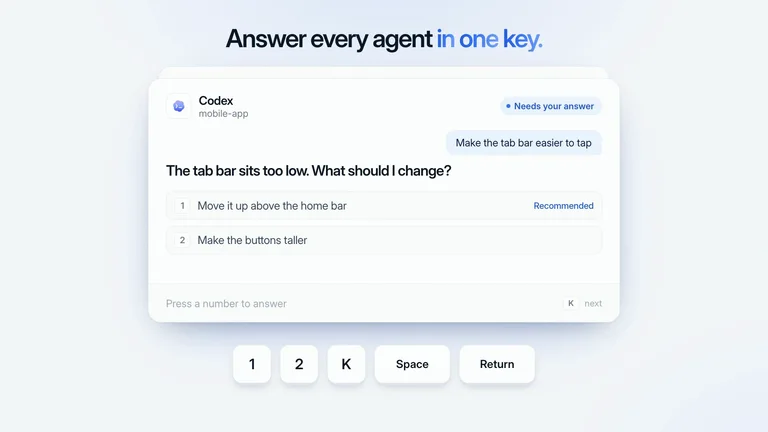
この Skill を購入すると何が手に入りますか?Agent カードの束にキー操作で次々返答します。数字キーで選択、K で次の Agent へ、Space と Return で送信。テキストはすべて自社製品の言葉に差し替えられ、明るくすっきりしたブルー基調のスタイルのまま、8.3 秒の 1080p または 4K MP4 をローカルで書き出せます。
よく選んでいる職種
2026年10月19日 に更新
プレビューギャラリー
類似の Skill
すべての Skill を見る




手に入るもの
- 編集できる 8.3 秒・1080p または 4K のモーションシーン:ワンキー回答。
- 初期値入りのテキストスロット 38 個。変えたい行だけ書き換えれば完成します。
- ワンコマンドのジェネレーターと、ローカルで MP4 を書き出すコマンド。
向いている人
- 製品ローンチ動画、リリースノート、新機能の告知。
- 明快なモーションが一つ欲しい SNS 用クリップやランディングページの Hero ループ。
- 多数の短いシーンを統一感のある上質なブルーでそろえたいチーム。
向いていない人
- 長尺素材や完成版ローンチ動画の全編編集。
- カラー変数を変えずにブルー以外のブランドカラーで使うこと。
- ナレーション、音楽、新しい AI 映像の生成。
プロダクトローンチ・アプリグロースCreate Product Launch Animationスタイル固定シリーズ統一編集可能な出力ミニマリストブルーアクセントClean Ui
この Skill について

LaunchMotion · ワンキー回答
Agent カードの束にキー操作で次々返答します。数字キーで選択、K で次の Agent へ、Space と Return で送信。テキストはすべて自社製品の言葉に差し替えられ、明るくすっきりしたブルー基調のスタイルのまま、8.3 秒の 1080p または 4K MP4 をローカルで書き出せます。
映っている内容
Agent カードの束にキー操作で次々返答します。数字キーで選択、K で次の Agent へ、Space と Return で送信。 シーンは 8.3 秒、1920×1080。やわらかな明るい背景で、アクセントカラーはブルーのみ。ロゴは元の色のままです。
変更できるテキスト
| スロット | 初期値 | 最大文字数 |
|---|---|---|
headline | Answer every agent in one key. | 34 |
agent-3 | Gemini | 12 |
project-3 | docs-site | 15 |
status-3 | Finished | 14 |
ask-3 | Rewrite the onboarding guide | 34 |
result-3 | The guide is ready. | 25 |
result-3-detail | Three pages, every link checked. | 38 |
file-1 | welcome.md | 16 |
file-2 | setup.md | 14 |
file-3 | faq.md | 12 |
reply-placeholder | Reply… | 12 |
footer-hint-3 | Press Space to reply | 26 |
sent-reply | Reply sent | 16 |
undo | to undo | 13 |
agent-2 | Codex | 11 |
project-2 | mobile-app | 16 |
status-waiting | Needs your answer | 23 |
ask-2 | Make the tab bar easier to tap | 36 |
question-2 | The tab bar sits too low. What should I change? | 53 |
q2-option-1 | Move it up above the home bar | 35 |
recommended | Recommended | 17 |
q2-option-2 | Make the buttons taller | 29 |
footer-hint | Press a number to answer | 30 |
footer-next | next | 10 |
sent | Answer sent | 17 |
agent-1 | Claude | 12 |
project-1 | web-app | 13 |
ask-1 | Add a pricing page to the site | 36 |
question-1 | Which layout should I build? | 34 |
q1-option-1 | Three plans with a yearly toggle | 38 |
q1-option-2 | One simple plan | 21 |
q1-option-3 | A side-by-side comparison | 31 |
key-space | Space | 11 |
key-return | Return | 12 |
sum-1 | answered | 14 |
sum-2 | answered | 14 |
sum-3 | shipping | 14 |
reply | Looks great, ship it | 30 |
自分のバージョンを作る
- Agent にこのシーンを依頼し、製品名・見出し・差し替えたい行を伝えます。
- Agent があなたのテキストでジェネレーターを実行し、プレビューして MP4 を書き出します。
- 冒頭・中盤・最後のフレームを確認し、改行が不自然な行は短くして再度書き出します。
動作要件
Node.js 22 以降、FFmpeg、HyperFrames CLI が必要です。すべてローカルで動作します。
始める前に必要なもの
- 用意するもの
- 製品名と画面に入れたいテキスト。すべてのスロットにそのまま使える初期値があります。
- 依存関係
- HyperFrames CLI 0.8.30 または互換版 — 必須 · Node.js 22 以降 — 必須 · FFmpeg — 必須
- 最終検証
- v1.0.1 — Claude Code / Claude Desktop / Cowork / Codex / ChatGPT
ユーザーレビュー
レビューを読み込み中…