Notion Style OG Image


 +7
+7Not on its own. Pair Claude with fal and an image Skill.
Claude Code Codex
Codex Cursor
 fal
falClaude can’t output images on its own. Pair it with fal: install an image Skill, add your fal API key, and Claude writes the prompts and generates posters, infographics and OG images in one consistent style.
Claude writes the prompt and drives the Skill; fal renders the image.

Pick the Skill built for what you will publish: an OG image, poster, infographic or illustration.
Each image Skill on Skillry is built for one job, such as a 1200×630 OG image, an event poster or an infographic, and carries its own layout, type and colour rules. Open a Skill page to see real examples first.
See all image Skills
Copy the install prompt from the Skill page and paste it into Claude Code.
Read https://skillry.dev/skills/<slug>/install.md and follow the instructions to install the skill.The Skill lands as a SKILL.md folder: ~/.claude/skills/ for Claude Code, ~/.agents/skills/ for Codex, and the matching folder for Cursor, Antigravity, OpenCode or GitHub Copilot.

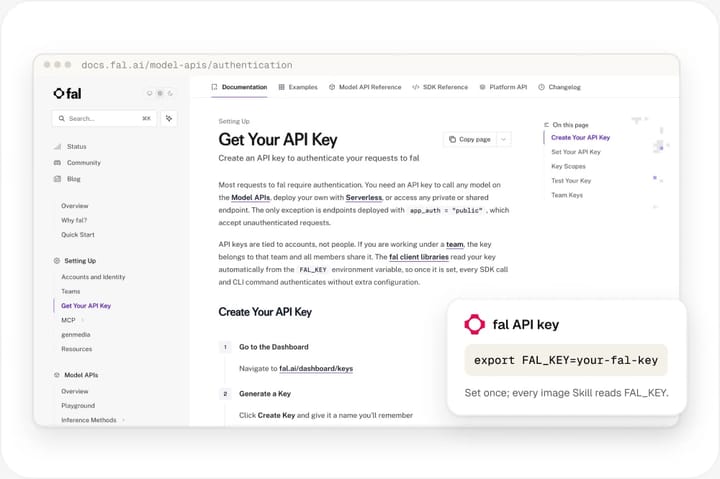
Create a key in your fal account and set it as FAL_KEY.
export FAL_KEY=<your-fal-key>Create an API key in your fal account and set it as an environment variable named FAL_KEY in the shell or project where your agent runs. The Skill reads that variable when it calls fal’s image models. Keep the key out of your repository: a git-ignored .env file or your shell profile both work.
Describe the image; Claude writes the prompt, calls fal and saves the file.
/<slug> “Launch post: v2 is live”Describe the topic, audience, headline and where the image will be used. If something is off, ask for a different crop, palette or headline and Claude re-prompts with the Skill’s style rules.
| Aspect | Claude alone | Claude + image Skill + fal |
|---|---|---|
| Reads and describes images | Yes | Yes |
| Outputs PNG / JPG files | No | Yes |
| Same style across images | No | Yes |
| Preset OG, social and print sizes | No | Yes |
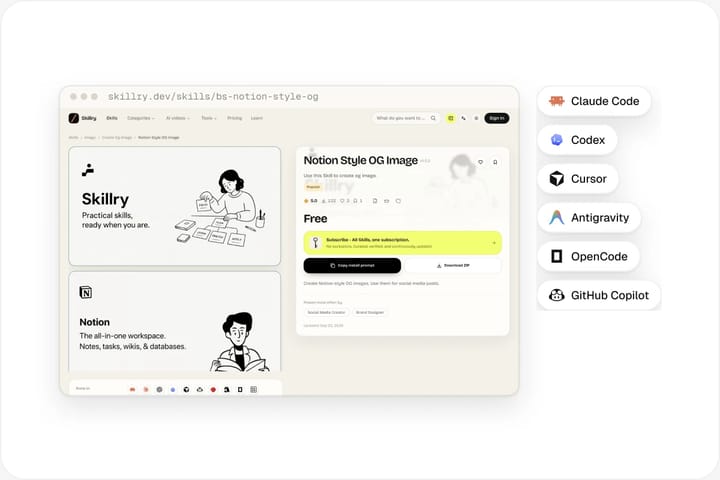
Image Skills are plain SKILL.md folders, and fal works the same everywhere.
Claude CodeCodexCursor Antigravity
 OpenCode
 GitHub Copilot
Claude reads images, describes them, critiques layouts and writes code that draws: SVG icons, HTML pages, chart scripts and diagrams. What it does not do is return a PNG or JPG file the way a dedicated image model does. Ask Claude for a picture in chat and you get a description, an SVG or a diagram, not a photo-style image. That is a limit of the output format, not of Claude’s visual judgment.
 How fal fills the gap
fal hosts image models behind one API. A Skillry image Skill tells Claude how to turn your request into a precise prompt, which size to use and which style rules to follow, then calls fal with your FAL_KEY and saves the result into your project. Claude stays in charge of the brief and the prompt; fal does the rendering. You pay fal directly for what you generate.
Claude can also call an image model through an MCP server, such as a Hugging Face Space connected to Claude. That suits one-off pictures, but you choose the model, prompt and size every time. Image Skills are the repeatable route: style, sizes and prompt rules are saved once, so every image matches.
Claude image generation compared with ChatGPT and Codex.
ChatGPT and Codex can generate images with their built-in GPT Image 2. Claude Code, Cursor, Antigravity, OpenCode and Copilot have no built-in image generation, so they use fal through a Skill. Skillry image Skills use fal by default in every agent, so the same Skill, prompts and FAL_KEY give matching results whichever agent your team uses.
No. Claude models return text, not image files. Claude can write SVG, HTML or chart code that renders as a graphic, and it can read and critique images you give it. For real raster images such as posters, OG images or illustrations, pair Claude with fal through an image Skill: Claude writes the prompt and fal renders the picture.
No. In the Claude app, Claude doesn’t create photos or illustrations the way image tools do, but it can make diagrams, charts and interactive visuals with HTML and SVG, and analyse images you upload. To create real images, run an image Skill in Claude Code with fal.
Skillry image Skills use fal. Create a fal API key, set it as FAL_KEY, and the Skill handles the model calls; you pay fal directly for what you generate. You do not need a separate account with each model provider, and the same key works for every Skillry image Skill you install.
Yes. Codex and ChatGPT can also generate images with their built-in GPT Image 2, but Skillry image Skills use fal by default in every agent, so the same FAL_KEY setup works everywhere.
Anything an image Skill is built for: OG and social share images, event and launch posters, infographics that explain a process, diagrams, editorial illustrations and article illustration sets. Each Skill fixes the size, layout and style, so a series of images looks like it came from one designer.
Yes. Style rules live in the Skill’s SKILL.md, so you can edit the palette, typography and layout once and every image follows them. Claude applies those rules when it writes each prompt, which keeps a whole series consistent without repeating your brand guidelines in every request.
Some image Skills are free and others cost $4.99 once. Image generation itself is billed by fal to your own fal account, based on what you generate. Claude Code or your other agent is billed separately under your existing plan.
Pick a style, add your fal key, describe what you need.