Generate an original brand mascot with an AI Skill
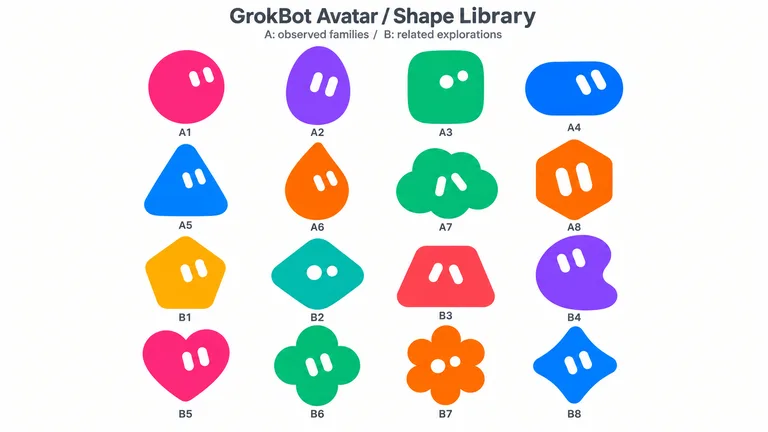
Choose from 16 rounded silhouettes, describe who your mascot is, and get a toy-like character with simple solid eyes and vivid colour. Approve a shape and it turns it into a matching figure.


 and 30+ other agents

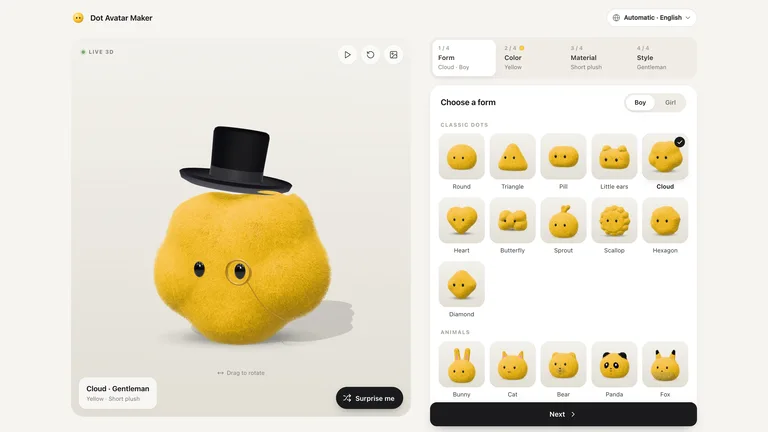
Original mascot examples
Real characters from GrokBot Avatar, plus Dot Avatar Maker for building one by hand in the browser.
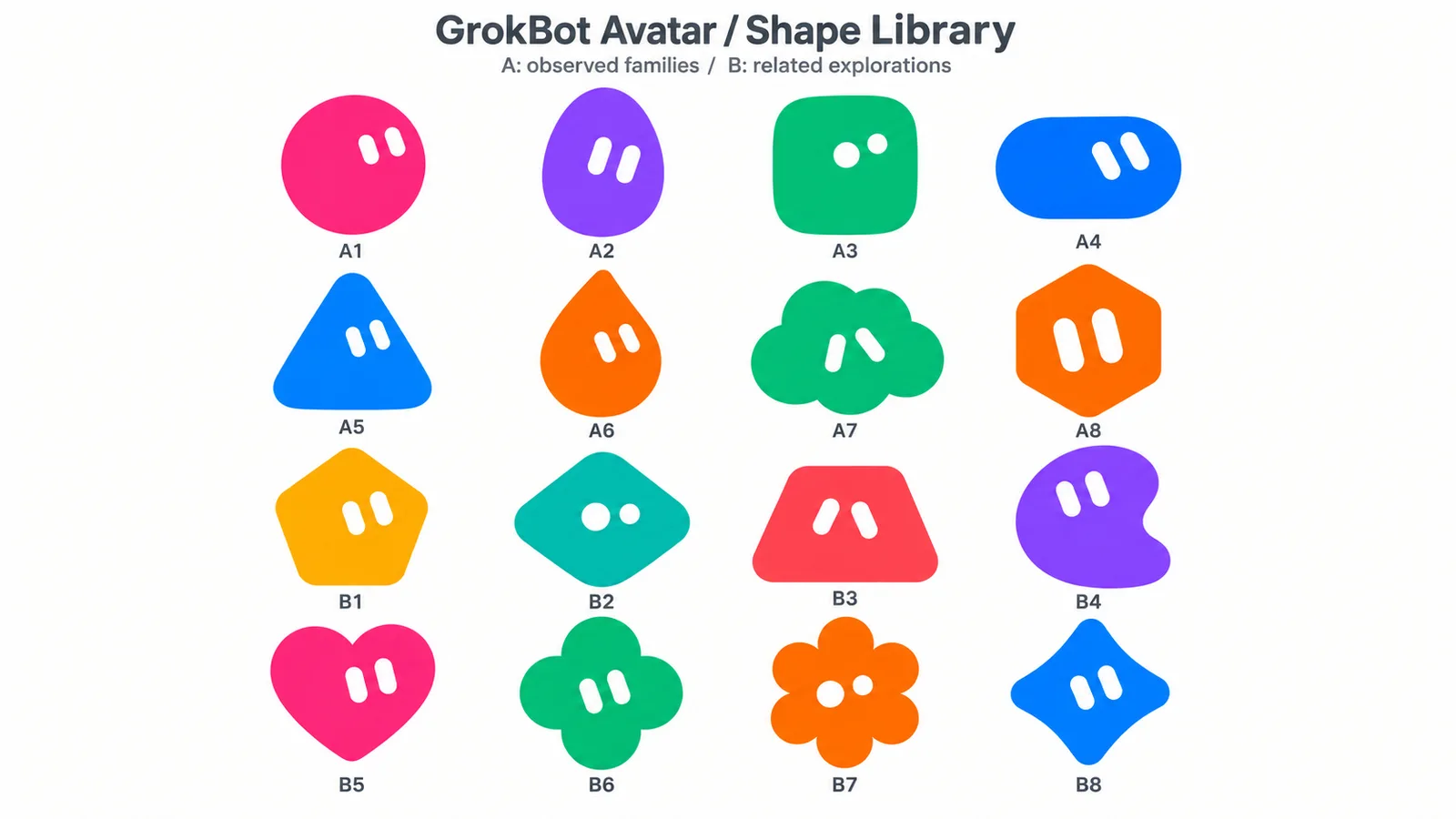
GrokBot Avatar
Create rounded Original mascots or cute soft-vinyl Anime avatars with simple solid eyes and vivid colors. Follow explicit character requests first, use reliable user memories to personalize missing details for a personal avatar, and turn an approved shape into a matching toy-like character when requested.
You get
- Two shape atlases with 16 rounded silhouette directions for Original avatars, with support for other shapes you request.
- Eight soft-vinyl character references for cute, large-headed toy avatars with simple eyes, matte surfaces, and subtle technology details.
- Request-first personalization: explicit character details take priority, while reliable user memory can fill missing details for your own avatar.
Runs on
Codex with the built-in image-generation tool available · Uses Codex built-in image generation, subject to the account's tool availability and usage limits. No external provider API key is required.
Also for this job

Choose a silhouette and character brief
A good mascot reads from its outline alone. Start from a shape you like, then add colour, personality and one or two details. Anything you say explicitly wins over the defaults.
Pebble
Meet Pebble, your study buddy
Pebble keeps you company through every revision session, cheers you on and reminds you to take a break.
Get the app
- Original mascots
- Two atlases of 16 rounded silhouette directions
- Anime avatars
- Eight soft-vinyl, large-headed toy references
- Personal avatar
- Fills missing details from what your agent knows about you
- You provide
- A character idea, or nothing to start from a shape
- Runs on
- Codex with its built-in image generation
- Running cost
- Free Skill; uses your Codex image limits, no API key
Generate and refine the mascot
Shape first, details second. Most mascots take two or three rounds.
 1
1Install the Skill
Paste the install prompt into Codex.
 2
2Pick a silhouette
Choose a rounded shape, then describe colour, mood and one signature detail.
 3
3Refine the figure
Ask for changes until the character reads at small sizes.
Why not just ask your AI for a mascot?
Asking directly gets you a result. A Skill adds the parts that make it reliable and repeatable.
Mascot generator FAQ
What these Skills do not do
- They do not make physical mascot costumes.
- They do not deliver editable vector logos.
- They do not rig or animate the character.
Is the mascot generator free?
Yes. GrokBot Avatar is free and runs on Codex’s built-in image generation, within your account’s usage limits. No external API key is needed.
Can I make an anime-style avatar?
Yes. Ask for a cute soft-vinyl anime avatar; the Skill uses eight large-headed toy references with simple eyes and matte surfaces.
Can I build a mascot by hand instead?
Yes. Dot Avatar Maker is a free browser tool where you pick a shape, colour and expression and export a transparent PNG.
Can I use the mascot as my logo?
You get raster images, not an editable vector logo. Many brands redraw the final character as a vector for logo use.
More jobs for content creators
Each job has its own Skills, real examples and FAQ.
 OG imagesLink previews for every page you share
 Doodle illustrationsCute crayon art for playful posts
 Black and white portraitsA studio portrait from a photo you have
 Promo videosShort brand films in a reusable style