
The short answer
- 1Call it by name:
/skill-nameor$skill-name. If it runs, the install is fine. - 2Not found? Check the folder.
SKILL.mdhas to sit directly in<skills folder>/<name>/. - 3Still stuck? Find what you’re seeing below.
Find the problem in 30 seconds
Match what you see on the left, then jump to the fix on the right.
Calling it by name fails
It isn’t where your agent looks. See Skill not showing up.
It runs by name but not from a normal request
Check the description or settings. See Skill not triggering.
A different Skill runs
Two descriptions overlap. See Wrong Skill runs.
It starts, then stops
Something it depends on is missing. See Fails partway.
It runs the old version
There’s a second copy, or the session is stale. See Old version.
Skill not showing up in Claude Code, Codex or Cursor
If a Skill isn’t in /skills or Customize → Skills, the agent hasn’t loaded it. Most often the folder is in the wrong place or one level too deep.
| Likely cause | Fix |
|---|---|
You installed it for Claude Code with the Skillry CLI but left out --agent claude-code | Reinstall with the flag. Without it, the CLI uses ~/.agents/skills/ |
| The ZIP added an extra folder level | Move the inner folder up one level. Claude Code needs exactly skills/<name>/SKILL.md |
A mistake in the frontmatter between the --- lines | Fix it. Codex and Cursor need name and description, and in Cursor name must match the folder name |
| The agent hasn’t picked it up yet | Claude Code: /reload-skills. Codex: restart it inside the repo. Cursor: new chat or reload the window |
Codex in the ChatGPT desktop app: $ finds nothing | A reported bug (openai/codex#28505). Check /skills, restart, or try a copy in ~/.codex/skills/ (we haven’t tested this yet) |
For every folder each agent reads, see Skill locations.
Skill shows up but isn’t triggering on its own
The agent decides whether to use a Skill by reading its description. When a Skill only runs if you call it by name, either the description doesn’t match how you ask or a setting is holding it back.
- Try the example prompt from the Skill’s page. It’s written to match the description.
- Check
paths. It limits automatic use to matching files. - Lots of Skills installed? The agent shortens or drops descriptions to fit them all, so put the main use first. See Triggering.
A different Skill runs instead
When two installed Skills describe the same job, they compete, and the agent picks the one that reads closer to your request. Usually that means two Skills for similar work, or the same Skill installed twice.
| What’s going on | Fix |
|---|---|
| A similar Skill keeps winning | Call the one you want by name: /skill-name in Claude Code and Cursor, $skill-name in Codex. Calling by name always runs that Skill. |
| Your own Skills overlap | Narrow each description by input, audience or output so each one covers a single job. See Triggering. |
| The same name is installed twice | Claude Code uses Enterprise first, then personal, then project. Codex may list both. Keep one copy. |
| One Skill keeps starting when you didn’t ask for it | Make its description more specific about when to use it, so it stops matching unrelated requests. Then call the Skill you want by name. See Triggering. |
It starts, then fails partway
This is almost always a missing dependency: the wrong Node.js version, or no Python, FFmpeg or FAL key. The Skill page lists what it needs, so check that first:
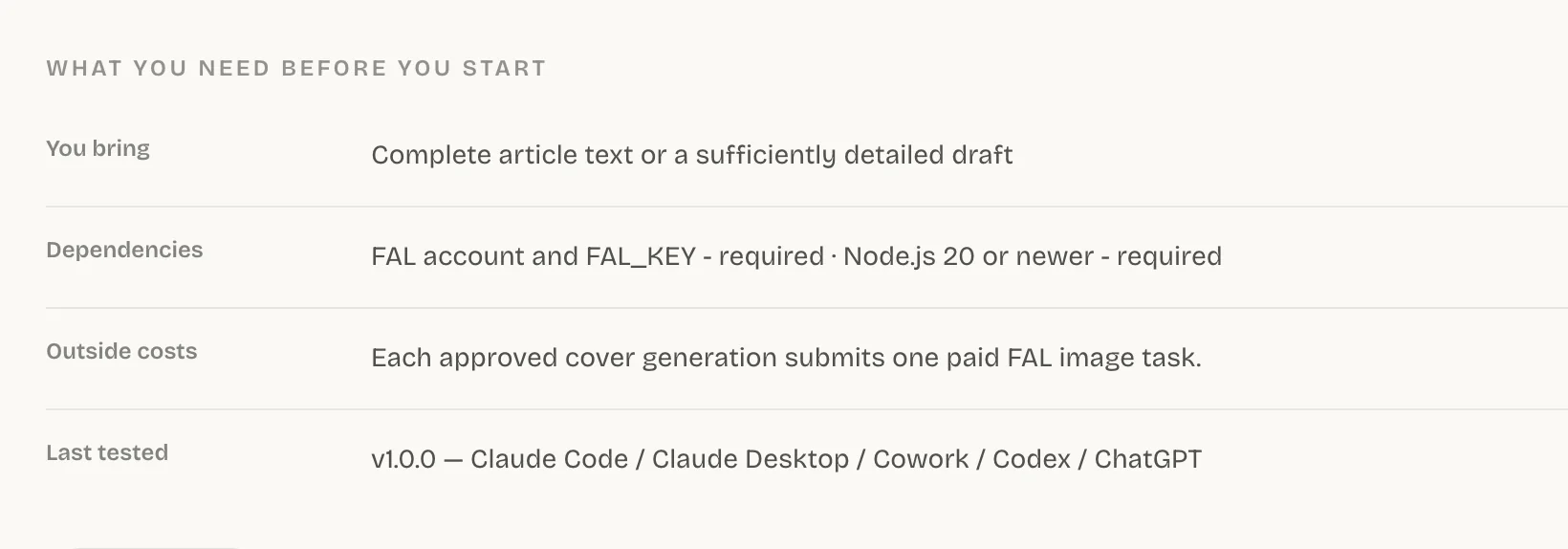
It keeps running the old version
You updated the Skill but the agent still behaves the old way. One of these is the reason:
- Only
SKILL.mdwas replaced. Reinstall with--force, or replace the whole folder. - Another copy with the same name is installed somewhere else. Remove it.
- In Claude Code, a Skill that already ran stays as it was for the rest of that conversation. Start a new conversation to pick up your edits.
For backups and rolling back, see Manage and update.
Works on your machine, not in the cloud
Cloud sessions run on another machine, so a Skill that only lives on your computer doesn’t come along unless you set it up:
| Agent | Fix |
|---|---|
| Claude Code | Cloud sessions: commit it to .claude/skills/, or turn it on at claude.ai. Cowork: turn it on at claude.ai. |
| Codex | Standalone Skills don’t reach ChatGPT on the web or mobile. Ship it in a plugin. |
| Cursor | Keep it in ~/.cursor/skills/, then turn on Settings → Agents → Context and Tools → Sync Skills for Cloud Agents. |
Skillry CLI error messages
Find the message the Skillry CLI printed, then do what the right column says.
| You see | Do this |
|---|---|
| “Not logged in.” or “Session expired.” | Run npx --yes skillry-cli@latest login |
| “…already exists. Re-run with --force to replace it safely.” | Add --force. Your old copy gets backed up |
| “This Skill requires a paid plan.” | Check the Skill’s price or your plan |
| “--agent and --target cannot be used together.” | Pick one of the two |
| “Secure session storage is currently supported on macOS and Windows only.” | On Linux, use the install prompt or Download ZIP |
Common questions
Why isn’t my Claude Code Skill loading?
Usually it’s in ~/.agents/skills/ instead of ~/.claude/skills/, or there’s an extra folder level. Fix the path, then run /reload-skills if the folder is new.
Why does my Skill ask for an API key?
It uses a paid service, listed under Outside costs on the Skill page. Set the key the way that service tells you to, and never paste it into the chat.
How do I know the install worked?
It shows up in /skills (Customize → Skills in Cursor) and runs when you call it by name.
Sources
Did this guide help?